
Search documentation
Search documentation pages and implementation topics.
Summary
Start here for the platform-level model: indexes, media, extraction engines, extraction executions, search, connectors, exports, and webhook-driven workflows.
Overview
VideoVector exposes a public workflow surface for teams that need to ingest media, define extraction logic, run extraction execution, search results, and deliver outputs into surrounding systems.
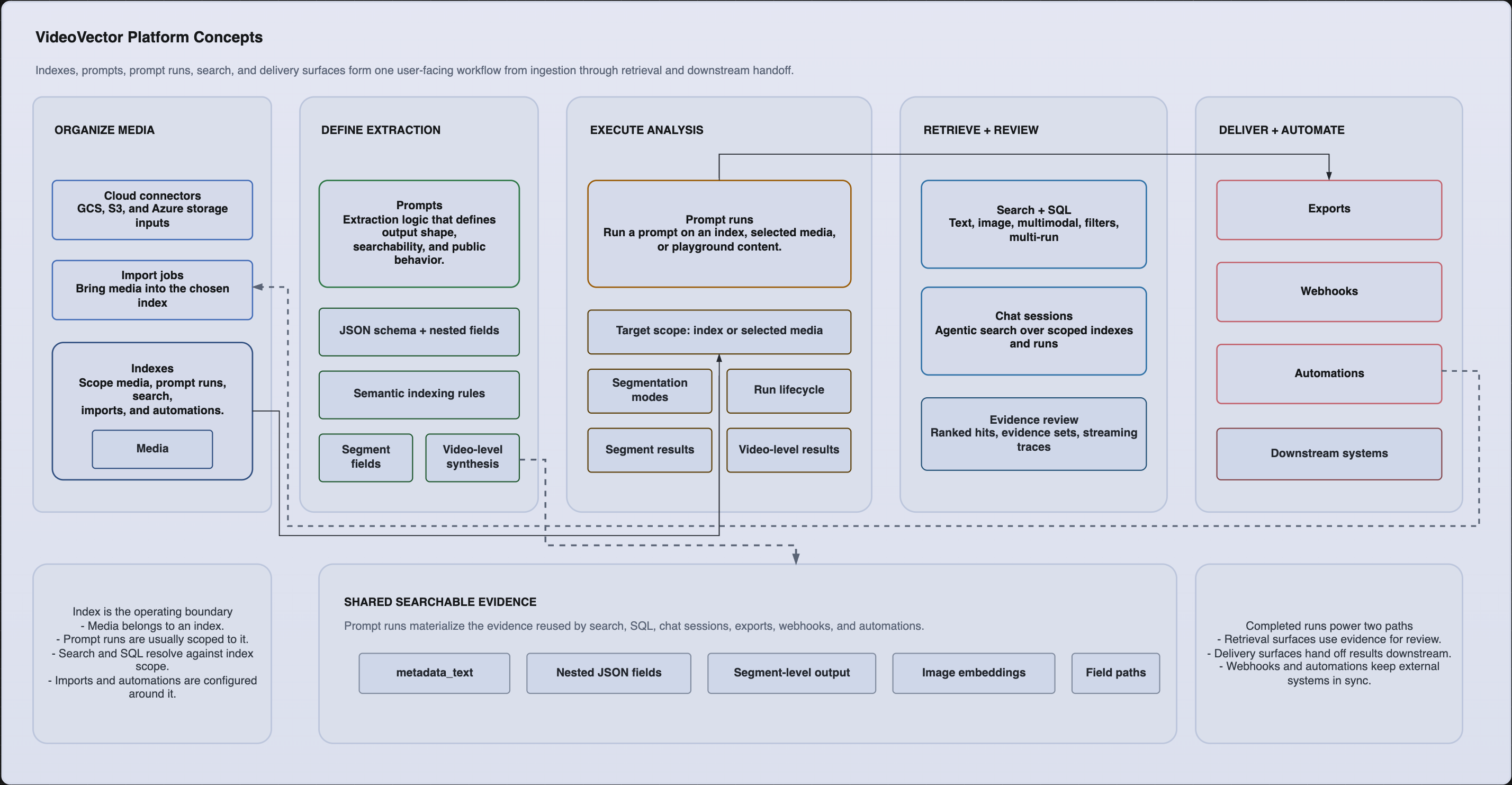
Platform concepts relationship and workflow diagram. Editable source:
This section explains the platform model from highest level to implementation detail:
- Platform model: indexes, media, extraction engines, extraction executions, results, connectors, exports, and webhooks.
- Extraction schema design: JSON schema rules, nested fields, repeated objects, reserved names, and semantic indexing controls.
- Extraction execution model: target selection, segmentation modes, transcription, image embeddings, segment-level outputs, and video-level synthesis.
- Search model: text, image, multimodal, filter, multi-run, SQL, and agentic search behavior.
- Integration and Automation model: connectors, imports, exports, webhooks, and event delivery.
When to use this section
Use the concepts pages when you need to answer design questions such as:
- What is the correct unit of organization for a workflow: an index, an extraction engine, or an extraction execution?
- When should a field live in segment-level output versus video-level synthesis?
- Which fields are searchable, filterable, or safe to exclude from semantic indexing?
- When should downstream systems use exports, webhooks, or persistent automation settings?
What to read next
If you already know the platform model and want implementation steps, go to Guides. If you need endpoint-level details, go to API reference. If you want code-first integration, start with the Python SDK or MCP docs.
Concepts / platform-model
Platform model
Understand the public VideoVector entity model: indexes, media, extraction engines, extraction executions, results, search, connectors, exports, and webhook targets.
VideoVector's public workflow model is intentionally composable. You define the media collection, define the extraction logic, run that logic against a target, then search or deliver the outputs.
The same model supports schema-aware metadata extraction, video-to-vector embeddings, multimodal media embeddings, and
hybrid vector and metadata search. metadata_text connects structured extraction output to the semantic retrieval layer
without removing the exact fields needed for filters and exports.
Core entities
Indexes
An index is the primary collection boundary for media and related workflows.
- Media can be uploaded directly into an index or imported into it from a connector.
- Search is usually anchored to an index, even when the request also spans multiple indexes.
- Import and export automation settings are configured per index.
- Webhooks can be scoped to all indexes or a selected set of index IDs.
Media
A media item is a video, audio file, or image stored in the platform.
- Media appears with a
video_ideven when the media type is audio or image. - Media can be uploaded directly, created from a URI, or imported from a connector.
- A media item can participate in multiple extraction executions over time.
- Media exposes segment views, processing state snapshots, markers, preview helpers, and batch inspection utilities.
Extraction engines
An extraction engine defines what the platform extracts.
prompt_textcontains the segment-level instruction.json_schemadefines the segment-level output contract.video_leveloptionally adds a separate video-wide or audio-wide synthesis stage.semantic_indexinglets you exclude selected output leaves from semantic embedding.
Extraction executions
An extraction execution is one execution of one extraction engine against one target.
- The target can be an entire index, a selected list of media IDs, or playground media.
- Each run records execution settings such as segmentation mode, durations for fixed segmentation, model selection, transcription, and image embeddings.
- Runs expose status, per-media counts, failure manifests, segment retry state, and optional video-level result availability.
Results
A completed run produces two public result layers:
- Segment-level results: one result per processed segment with structured metadata and
metadata_text. - Video-level results: one synthesis result per media item when
video_levelis enabled on the extraction engine.
Search primarily works across segment-level results, while video-level outputs are retrieved directly from a run when needed.
How public workflows connect
- Create an index.
- Upload media or import it from a connector.
- Create an extraction engine with a JSON schema.
- Execute an extraction run against the index, a selected set of media items, or playground content.
- Inspect run state and results.
- Search, export, automate, or deliver the outputs.
curl -X POST https://api.vectormethods.com/api/v2/indexes \
  -H "Authorization: Bearer <token-or-api-key>" \
  -H "Content-Type: application/json" \
  -d '{"name":"Broadcast Archive"}'
An extraction engine definition is reusable. The same engine can be executed many times across different indexes or selected media IDs, producing distinct extraction executions.
Collections versus executions
Use the entity boundaries consistently:
- Use an index when you need a stable collection boundary.
- Use an extraction engine when you need a reusable extraction contract.
- Use an extraction execution when you need execution-specific state, results, and auditability.
That separation is important for search as well. Search requests can limit to:
- all searchable runs in an index
- selected run IDs
- multiple indexes
- structured filters over extraction output fields
Delivery resources
Once outputs exist, the rest of the public surface is about integration and automation:
- Connectors define cloud storage access.
- Import jobs pull media into an index.
- Exports write extraction results out as downloadable or connector-delivered artifacts.
- Automations schedule import and export behavior per index where persistent delivery is needed.
- Webhooks push lifecycle events to your own endpoints.
What is intentionally not part of the public model
This documentation does not define internal queue mechanics, worker topology, scaling behavior, or credit and billing flows. Those are not required to use the platform successfully.
Concepts / prompt-schema-design
Extraction schema design
Design VideoVector extraction schemas with nested objects, repeated fields, semantic indexing controls, and video-level synthesis contracts.
VideoVector uses JSON Schema with a root object to define the output contract for the extraction engine.
Schema-aware metadata extraction means the extraction output is shaped by your JSON schema before analysis runs. Video,
audio, and image workflows can return nested schema outputs, repeated object paths, and metadata_text that later
supports search, filters, exports, and video-level synthesis.
Segment-level schema
The segment-level schema lives in json_schema.
- The root type must be
object. - Fields can be primitive values, objects, or arrays.
- Nested objects and repeated objects are supported and surfaced in search and filter tooling.
- The schema is part of the extraction engine definition, not part of the execution request.
{
  "type": "object",
  "properties": {
    "summary": { "type": "string" },
    "scene": {
      "type": "object",
      "properties": {
        "location": { "type": "string" },
        "people": {
          "type": "array",
          "items": {
            "type": "object",
            "properties": {
              "name": { "type": "string" },
              "emotion": { "type": "string" }
            }
          }
        }
      }
    }
  }
}
Nested fields and repeated object paths
Nested data is addressable in public search and filter tooling through canonical field paths:
scene.locationscene.people[].namescene.people[].emotion
Repeated objects use [] in field paths. That same path form appears in condition-style filtering and in search field selection.
Use stable, explicit property names. Search, filter, and semantic indexing configuration are easier to manage when field paths remain predictable across extraction engine iterations.
Reserved field-name rules
Extraction field names are part of the public query contract. Avoid special characters that break field-path parsing.
- Do not use
.,[or]inside field names. - Do not use reserved internal field names such as
__pydantic_extra__. - Dictionary-like object fields that disallow additional properties should still define at least one nested field.
Semantic indexing controls
Semantic indexing is configured at the extraction engine level:
disabled_segment_fieldsdisabled_video_level_fields
Use those lists when you want fields to remain in structured output but stay out of semantic embedding.
Typical reasons to disable a field:
- the field is high-volume but low-value for semantic retrieval
- the field contains internal bookkeeping
- the field is dynamic or sparse enough that embedding it would add noise
Video-level schema
The optional video_level block adds a second schema for media-wide synthesis:
instructions_text: the video-wide instructionincluded_segment_fields: segment fields supplied to the synthesis stepjson_schema: the video-level output contract
included_segment_fields can reference declared segment fields and certain system-provided fields such as transcription and metadata_text. Timing context such as start_time and end_time is automatically included where applicable.
{
  "instructions_text": "Summarize the full program and identify the primary incident timeline.",
  "included_segment_fields": ["summary", "scene.people[].emotion", "transcription"],
  "json_schema": {
    "type": "object",
    "properties": {
      "program_summary": { "type": "string" },
      "incident_timeline": {
        "type": "array",
        "items": { "type": "string" }
      }
    }
  }
}
Schema testing
The public surface includes schema validation endpoints and matching SDK/MCP methods so you can validate sample data against a schema before storing the extraction engine. Use that validation step whenever the schema includes nested objects, repeated arrays, or constrained types.
Design recommendations
- Put evidence-level facts in segment output.
- Put rollups, totals, and cross-segment conclusions in
video_level. - Keep field names operationally useful because they appear later in search, filters, and exports.
- Treat schema changes as contract changes. Existing extraction executions keep their own historical output shape.
Concepts / prompt-execution-model
Extraction execution model
Learn how VideoVector executes extraction engines across indexes, selected media, and playground content, including segmentation modes and video-level synthesis.
An extraction execution is the execution boundary for media processing. It ties together the target, segmentation settings, optional transcription and image embeddings, and the final results.
Segment-driven video analysis keeps timestamped segment evidence as the primary review layer. Video-level synthesis can then summarize selected segment fields without replacing the segment records that search, filters, recovery, and exports depend on.
Targets
Extraction executions accept three public target modes:
index: run against all eligible media in an indexvideos: run against a selected list of media IDs, optionally scoped to an indexplayground: run against playground media
Use index when the collection itself is the workflow boundary. Use videos when an operator or upstream system has already chosen the exact media items to process.
Segment-level extraction
The segment-level extraction engine is always driven by:
prompt_textjson_schema- segmentation settings in the run request
Every processed segment produces a structured result plus metadata_text, which is used throughout the public search surface.
Video-level synthesis
Video-level synthesis is optional and only runs when the extraction engine definition includes video_level.
The video-level step:
- runs after segment-level results exist for a media item
- receives the selected
included_segment_fields - produces a single media-wide output for that item
- does not replace segment results
Use video-level synthesis for whole-program or whole-asset rollups. Use segment-level output for precise evidence and retrieval.
Segmentation modes
Video segmentation
Video extraction executions support:
fixedcontent_aware
fixed also requires video_segment_duration.
Audio segmentation
Audio extraction executions support:
content_awarefixed
fixed also requires audio_segment_duration.
Images
Images are processed as single-item media with image segmentation semantics rather than time-based segment selection.
Transcription and image embeddings
Extraction execution requests also control two important side behaviors:
enable_transcriptionenable_image_embedding
These flags affect public search and run outputs:
- transcription contributes searchable text and transcription success/failure state
- image embeddings enable visual retrieval workflows
Transcription and image embeddings are execution settings, not extraction-engine settings. Different executions of the same engine can choose different values for those flags.
Lifecycle and retry behavior
A run moves through terminal and non-terminal states such as pending, processing, completed, completed_with_failures, failed, and cancelled.
Public lifecycle controls include:
- estimate a run without starting it
- execute the run
- poll or stream status
- cancel the run
- inspect failed segments
- retry a failed segment without creating a replacement run
Example run request
{
  "prompt_id": "prompt_episode_extract",
  "target": {
    "type": "videos",
    "index_id": "idx_archive",
    "video_ids": ["vid_001", "vid_002"]
  },
  "video_segmentation_type": "content_aware",
  "audio_segmentation_type": "content_aware",
  "processing_model": "gemini-2.5-flash",
  "enable_transcription": true,
  "enable_image_embedding": true
}
Choosing segment-level versus video-level output
Use segment-level output when:
- search precision matters
- downstream review needs timestamps
- the output should be filterable at evidence level
Use video-level output when:
- the user needs one answer per media item
- the result depends on combining segment evidence
- the downstream consumer wants a rollup, not the raw evidence set
Concepts / search-model
Search model
Understand the public VideoVector search surface, including text, image, multimodal, filter, multi-run, SQL, and agentic search.
The public search surface combines semantic retrieval, structured filtering, cross-run lookup, SQL-style querying, and agentic chat sessions.
That search surface is designed for video vector embedding search rather than transcript-only lookup. Teams can combine metadata_text embeddings, visual context, nested schema fields, extraction execution scope, and SQL or agentic media search over the same indexed media foundation.
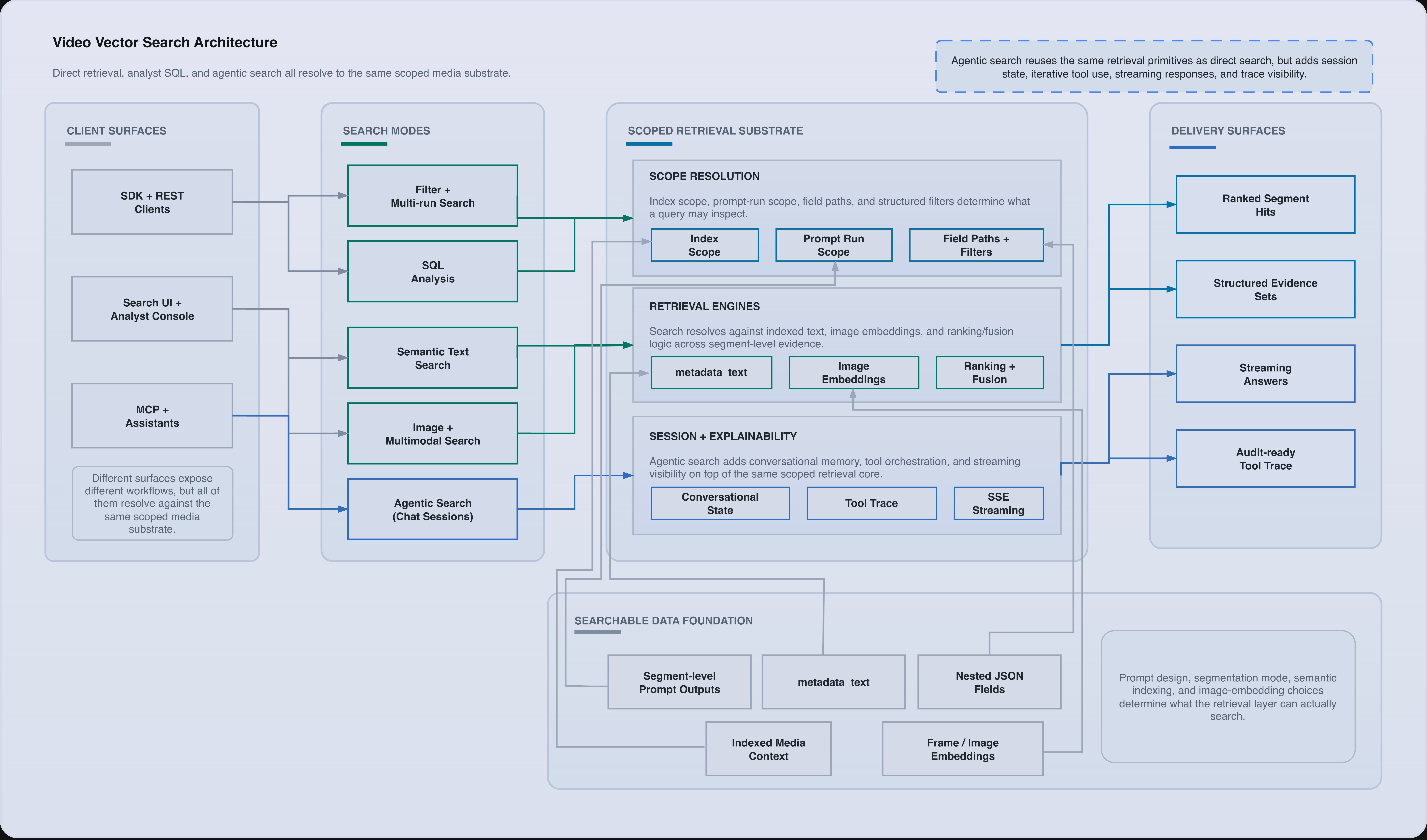
Search architecture across direct retrieval, SQL analysis, multimodal search, and agentic search over the same scoped media substrate.
Searchable inputs
Search operates over indexed media context and extraction execution output. Depending on the mode, the relevant public inputs include:
metadata_text- selected extraction fields
- image embeddings
- run IDs
- index IDs
- structured field paths
Text search
Text search uses a natural-language query and optionally a list of search_fields.
Use text search when the user knows what they are looking for conceptually:
"person walking through station""red emergency vehicle at night""speaker explains evacuation route"
Image search
Image search accepts base64-encoded image data and returns segments with visual similarity metadata, including matched image timestamps when available.
Use image search when the operator has a frame, screenshot, still, or reference image and wants visually related results.
Multimodal search
Multimodal search combines text and image inputs in a single request.
text_queryimage_datatext_weightimage_weight
The public surface returns fused results rather than forcing clients to merge independent text and image result sets themselves.
Filter search
Filter search applies structured conditions to output fields.
Supported public field-path conventions include:
- nested object paths such as
scene.location - repeated object paths such as
scene.people[].emotion - array value paths and length-oriented operators
Conditions are AND-combined. Repeated object filters preserve same-item semantics for repeated objects, which is important when combining multiple conditions on the same repeated object path.
Multi-run search
Multi-run search is useful when a workflow needs to compare or aggregate across several completed extraction executions rather than searching one run boundary at a time.
Use it when:
- an index has several versions of the same extraction engine
- the operator wants best-per-run or combined ranking behavior
- a migration is comparing outputs from different extraction engine definitions
SQL search
SQL search exposes a catalog-plus-query workflow:
- request a run-aware catalog for an index
- execute SQL against that catalog
- optionally generate a draft SQL query from a natural-language request
SQL search is best when the user needs structured exploration, aggregations, selected columns, or analyst-style query control rather than simple retrieval.
SQL search is a query interface over already-available extraction execution data. It is not a replacement for extraction engine design, extraction execution, or media ingestion.
Agentic search
Agentic search uses agentic chat sessions as a conversational retrieval layer on top of the direct search APIs.
Use agentic search when the operator needs:
- iterative questioning instead of one fixed query
- scoped follow-up questions across one or more indexes or extraction executions
- result review with turn history and tool traces
- streaming responses for analyst or assistant-style interfaces
Unlike direct search, agentic search keeps conversational state. That makes it a better fit for investigator workflows, review copilots, and analyst assistants that need to refine retrieval over several turns.
Use direct search endpoints when the client already knows the exact retrieval pattern. Use agentic chat sessions when the workflow needs follow-up questions, narrowing, and conversational result review.
Search scope
Most public search flows can be restricted by:
- one primary index
- multiple index IDs
- selected run IDs
- selected search fields
That means search scope should be treated as part of application behavior, not as an afterthought. If two extraction executions produce incompatible shapes, scope them explicitly instead of assuming a generic union search will behave the way you want.
Result model
Search results return rich result objects rather than bare IDs. Public result payloads can include:
- media and segment identifiers
- timestamps
- preview text
- extracted metadata
- matched fields and field instance scores
- source run and source index information
That makes it possible to build both retrieval-first UIs and downstream integrations with the same result shape.
Concepts / workflow-automation-model
Integration and Automation model
Understand how connectors, imports, exports, persistent automation settings, and webhooks fit together in public VideoVector workflows.
The public integration surface starts with storage access and ends with results delivery.
Connectors
Connectors define cloud storage access for GCS, S3, and Azure Blob Storage.
Public connector concerns include:
- provider-specific credentials
- connector scopes:
import,export, or both import_mode- optional
export_base_path - connection testing and source browsing
The connector itself does not import or export anything. It defines where those operations are allowed to run.
Import jobs
An import job uses a connector to create media items in an index.
Key public import controls:
- source prefix
- file pattern
- recursive scan behavior
- optional import mode override
Import jobs are asynchronous and expose progress, created media IDs, failed files, and skipped files.
Export jobs
An export job packages result data either for download or connector-based delivery.
Exports can target:
- an entire index
- one specific extraction execution
They can optionally write to a destination connector rather than returning only a download URL.
Index-level automation settings
Persistent index settings store import and export automation behavior per index.
Import automation settings
Import automation settings watch a connector location and trigger import processing with:
- source connector
- prefix and pattern filters
- debounce interval
- recursive behavior
- a
prompt_presetthat must includeprompt_id
Export automation settings
Export automation settings send completed results to a destination connector with an optional destination subpath.
Webhooks
Webhooks push lifecycle events out of VideoVector.
Typical public webhook events include:
- media creation and processing events
- extraction execution lifecycle events
- export completion and failure
- import job completion, failure, and progress
Webhook delivery is observable. The public surface includes delivery logs, retry controls, secret rotation, and event-name discovery.
Choosing the right delivery mechanism
Use connectors and jobs when:
- the destination is cloud storage
- the workflow wants file-oriented data movement
Use webhooks when:
- an external application needs real-time event notifications
- downstream logic is event-driven
Use persistent automation settings when:
- the workflow should persist per index rather than requiring an operator to recreate each job
Failure boundaries
Each workflow resource has its own public failure surface:
- connector test failures
- import job failed and skipped file lists
- export job status and error fields
- webhook delivery attempt logs and manual retry
That separation is important. A successful import does not imply a successful export, and a successful extraction execution does not imply a successful webhook delivery.