
Search documentation
Search pages, API reference sections, and guide headings.
Summary
Search in VideoVector is built around segment-level prompt output, indexed media context, and scoped conversational retrieval. This page explains the major search modes and the field-path conventions they rely on.
The public search surface combines semantic retrieval, structured filtering, cross-run lookup, SQL-style querying, and agentic retrieval through chat sessions.
That search surface is designed for video vector embedding search rather than transcript-only lookup. Teams can combine metadata_text embeddings, visual context, nested schema fields, prompt-run scope, and SQL or agentic media search over the same indexed media foundation.
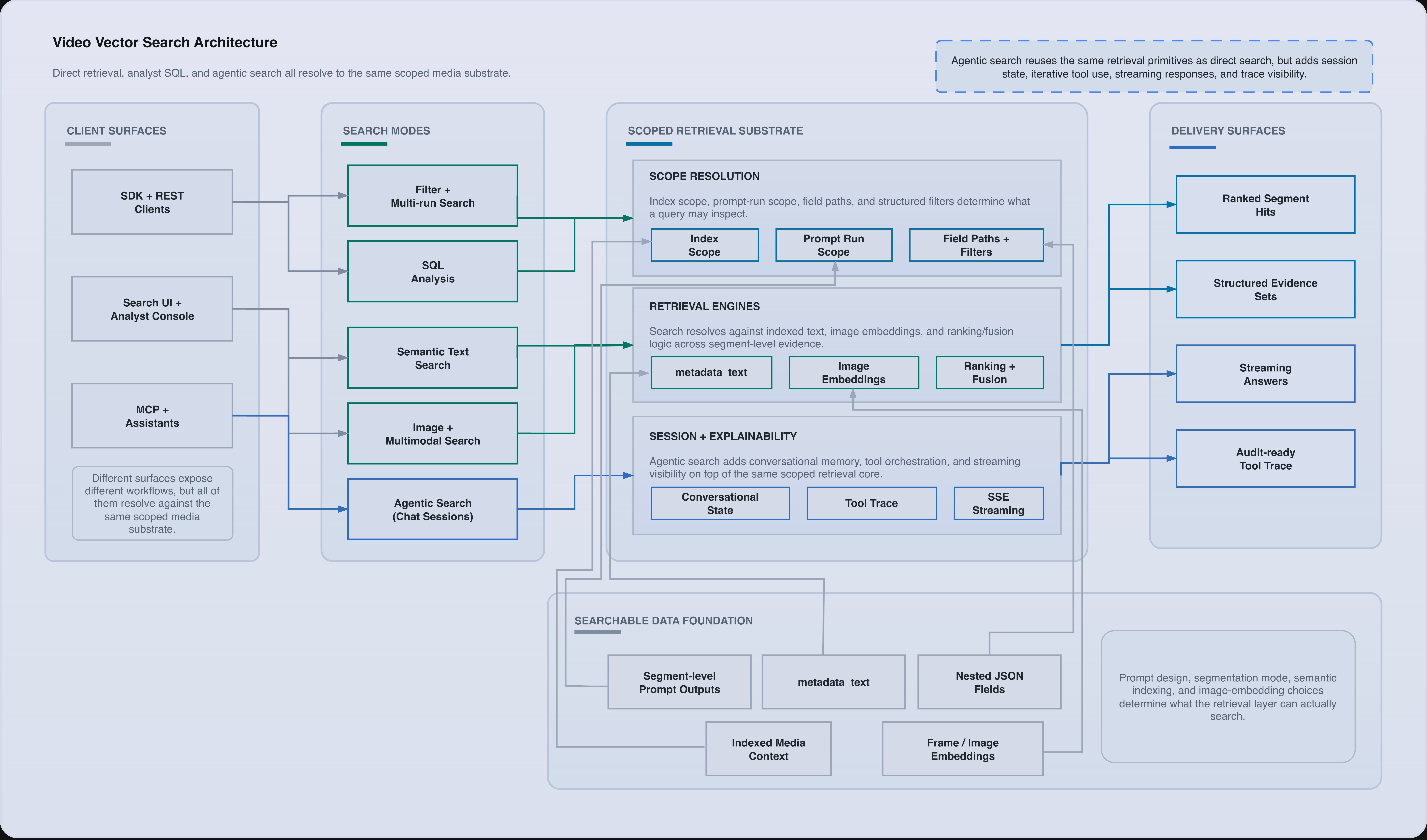
Search architecture across direct retrieval, SQL analysis, multimodal search, and agentic search over the same scoped media substrate.
Searchable inputs
Search operates over indexed media context and prompt-run output. Depending on the mode, the relevant public inputs include:
metadata_text- selected prompt fields
- image embeddings
- run IDs
- index IDs
- structured field paths
Text search
Text search uses a natural-language query and optionally a list of search_fields.
Use text search when the user knows what they are looking for conceptually:
"person walking through station""red emergency vehicle at night""speaker explains evacuation route"
Image search
Image search accepts base64-encoded image data and returns segments with visual similarity metadata, including matched image timestamps when available.
Use image search when the operator has a frame, screenshot, still, or reference image and wants visually related results.
Multimodal search
Multimodal search combines text and image inputs in a single request.
text_queryimage_datatext_weightimage_weight
The public surface returns fused results rather than forcing clients to merge independent text and image result sets themselves.
Filter search
Filter search applies structured conditions to output fields.
Supported public field-path conventions include:
- nested object paths such as
scene.location - repeated object paths such as
scene.people[].emotion - array value paths and length-oriented operators
Conditions are AND-combined. Repeated object filters preserve same-item semantics for repeated objects, which is important when combining multiple conditions on the same repeated object path.
Multi-run search
Multi-run search is useful when a workflow needs to compare or aggregate across several completed prompt runs rather than searching one run boundary at a time.
Use it when:
- an index has several versions of the same prompt
- the operator wants best-per-run or combined ranking behavior
- a migration is comparing outputs from different prompt definitions
SQL search
SQL search exposes a catalog-plus-query workflow:
- request a run-aware catalog for an index
- execute SQL against that catalog
- optionally generate a draft SQL query from a natural-language request
SQL search is best when the user needs structured exploration, aggregations, selected columns, or analyst-style query control rather than simple retrieval.
SQL search is a query interface over already-available prompt-run data. It is not a replacement for prompt design, prompt execution, or media ingestion.
Agentic search
Agentic search uses chat sessions as a conversational retrieval layer on top of the direct search APIs.
Use agentic search when the operator needs:
- iterative questioning instead of one fixed query
- scoped follow-up questions across one or more indexes or prompt runs
- result review with turn history and tool traces
- streaming responses for analyst or assistant-style interfaces
Unlike direct search, agentic search keeps conversational state. That makes it a better fit for investigator workflows, review copilots, and analyst assistants that need to refine retrieval over several turns.
Use direct search endpoints when the client already knows the exact retrieval pattern. Use chat sessions when the workflow needs follow-up questions, narrowing, and conversational result review.
Search scope
Most public search flows can be restricted by:
- one primary index
- multiple index IDs
- selected run IDs
- selected search fields
That means search scope should be treated as part of application behavior, not as an afterthought. If two prompt runs produce incompatible shapes, scope them explicitly instead of assuming a generic union search will behave the way you want.
Result model
Search results return rich result objects rather than bare IDs. Public result payloads can include:
- media and segment identifiers
- timestamps
- preview text
- extracted metadata
- matched fields and field instance scores
- source run and source index information
That makes it possible to build both retrieval-first UIs and downstream automation with the same result shape.
Related documentation
This guide shows how to choose the right public search mode for retrieval, filtering, comparison, conversational review, and analyst-style queries.
The search API combines semantic retrieval, exact metadata filtering, cross-run search, playground search, and analyst-style SQL execution on run-backed tables.
Chat sessions provide an agentic retrieval surface on top of search results and prompt-run scope. The API supports session CRUD, turn creation, optional scope narrowing, and streaming turn events over SSE for agent-search experiences.
Prompt schemas define what gets extracted, what becomes searchable, and what can be reused in video-level synthesis. This page covers the public schema rules and field-path conventions.